
Worksy for Multi Entity Single Holding
Every entity on its own terms. Every entity under one roof.


Most HR systems treat every entity like a separate problem.
A holding group with three subsidiaries shouldn’t need three HR setups. But that’s how most platforms handle it. Each entity gets its own configuration, its own data, and its own login. Policies that should differ by entity do, but no one at group level can see them side by side. Policies that should be consistent across the group aren’t, because there’s no system enforcing it.
The entities aren't the problem. The separation between them is.
Group HR maintains workarounds to pull cross-entity reports. Employee records sit in different systems depending on which subsidiary they belong to. When someone transfers between entities, their history doesn’t follow them cleanly. And every new entity added to the group means another setup, another reconciliation, and another spreadsheet to maintain.
Entity-level independence and group-level control, in the same platform.

Single Login Across All Entities
Entity-Specific Payroll, Leave, and Claims
Group-Level Reporting
Cross-Entity Access Control
Multi-Level Approvals Across Entity Lines
Consistent Compliance Across the Group
The group operates as a group, not as separate companies sharing a name.
Group HR spends its time on workforce planning and governance instead of maintaining the connection between systems that were never designed to talk to each other.
HR teams across Malaysia already work this way.









Frequently Asked Questions
- Can Worksy handle multiple entities or subsidiaries under one group?
Yes. Worksy supports multi-entity setups (parent company + subsidiaries) under one group structure, so you can:
-
Keep separate company settings (policies, payroll rules, leave types, public holidays)
-
Run consolidated reporting at group level (headcount, attendance trends, cost summaries)
-
Control who sees what across entities (HQ can view all, subsidiaries only their own)
If you’re running shared services (HR/Payroll at HQ), this is basically the whole point.
-
- What kind of approval workflows can we configure?
Worksy supports configurable approval flows for common HR actions (leave, claims, overtime, attendance edits, etc.). Typical options include:
-
Single-step (Employee → Manager)
-
Multi-step (Employee → Manager → HR → Finance)
-
Conditional routing (e.g., amounts over RM X go to Finance; special leave goes to HR)
-
Delegation / backup approvers (when approver is on leave)
-
Role-based approvals (not tied to one named person, so workflows don’t break when staff resign)
If your approvals currently live in WhatsApp and prayer, this will feel like civilisation.
-
- How does Worksy ensure compliance with Malaysian regulations?
Worksy is designed with Malaysian HR realities in mind, including:
-
Policy-based enforcement (leave, overtime, attendance rules, probation, entitlement rules as configured by your company)
-
Audit trails for approvals and changes (who changed what, when, and why)
-
Data controls (access restriction + retention/export support for HR documentation)
Important (and honest): software can support compliance, but it can’t magically make bad HR policy legal. You still set your rules; Worksy helps you enforce them consistently and prove it happened.
-
- Can we restrict access by department, region, or role?
Yes. Worksy supports granular access controls so you can segment by:
-
Department (e.g., Sales HRBP only sees Sales)
-
Region / branch / location (useful for multi-state ops)
-
Role (Employee, Manager, HR, Payroll, Finance, Admin)
-
Entity/subsidiary (if you’re running a group structure)
Result: managers don’t “accidentally” browse payroll data like it’s Instagram.
-
- We already have some systems in place. Can Worksy integrate?
Usually yes — depending on what you have and how modern it is.
Common integration paths:-
Data import/export via CSV/Excel for initial sync and ongoing updates
-
API-based integration (if your existing system supports APIs)
-
Typical targets: accounting/payroll providers, biometric/attendance devices, ERP, or custom internal systems
If the current system is “a legacy database + someone’s cousin’s Access file,” we can still work with it — just expect more elbow grease.
-
- Do you offer migration service?
Yes. Migration can include:
-
Importing employee profiles, org structure, job history
-
Carrying over leave balances, entitlements, and policy setup
-
Bringing in historical attendance/leave records (where feasible)
-
Validation checks to avoid garbage-in-garbage-out
Most migrations fail because the old data is messy, not because the new system is. We’ll tell you upfront what’s clean, what’s risky, and what needs manual decisions.
-
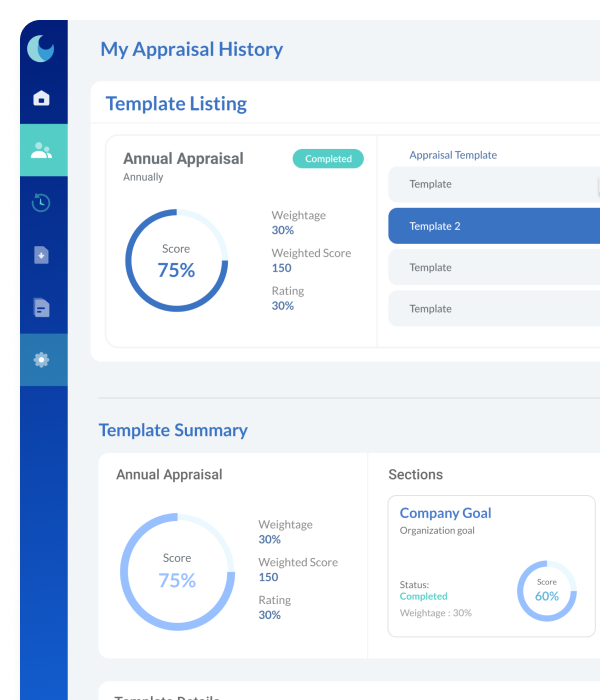

No more reconciling three systems to see one group.
When every entity runs inside one platform with its own policies and its own controls, the group gets the oversight it needs without taking away the independence each subsidiary requires. That’s how Worksy handles multi-entity HR.
#WorkMadeEasy